Grow more, manage less.
Track hours and harvest, approve the day, pay fairly. All in one place.
See Agromigo in a few minutes
Follow a normal week: plan your people, check every hour before payroll and ask Migo.
What Agromigo does for you
Labor registration, production registration, labor planning and payroll in one. No proprietary hardware. GDPR compliant. Works on the phones you already have.
Hours logged where work happens
Workers log hours, stems, quantities and carts on a phone, or the supervisor logs for the team.
Every hour checked before payroll
Supervisors review, correct and approve time entries, so mistakes never reach payroll.
Pay that rewards output
Tie pay to stems, quantities or carts. Top performers earn more and labor costs go down.
Plan the work, see every row
Plan hours by zone and crop, then see on the greenhouse map what happens where.
Reports without IT
Build cost per kg or stems per worker yourself, or simply ask Migo, your AI assistant.
Balances that keep themselves
Leave, time-for-time and sickness balances update automatically, ready for payroll or inspection.
Trainings every worker confirms
Publish a video, PDF or link once. Every worker confirms it in the dashboard, and you see who still has to.
New workers ready on day one
A new worker scans a QR code and registers on their own phone, in their own language. You check and activate.
Every site its own boundary
Each greenhouse with its own address is a separate site, even within one organization. Workers, activities and access are given per site. People see and record work only at their own sites.
Three ways to log time
Pick what fits your crew, or mix modes across teams.
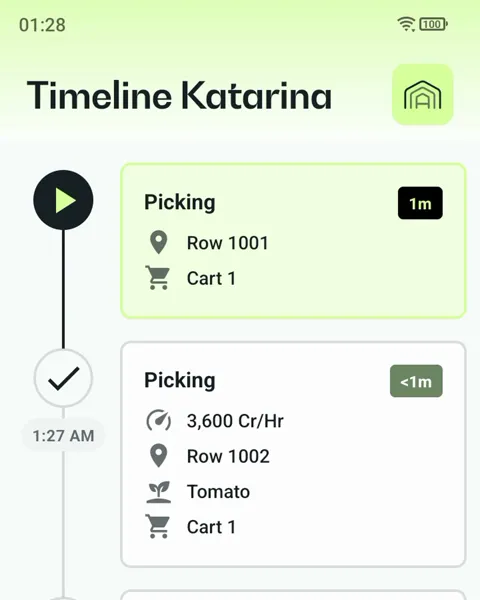
Personal
Know every row. Each worker logs crop, count and pace on their own phone.
Best when workers scan rows, crates or punnets.
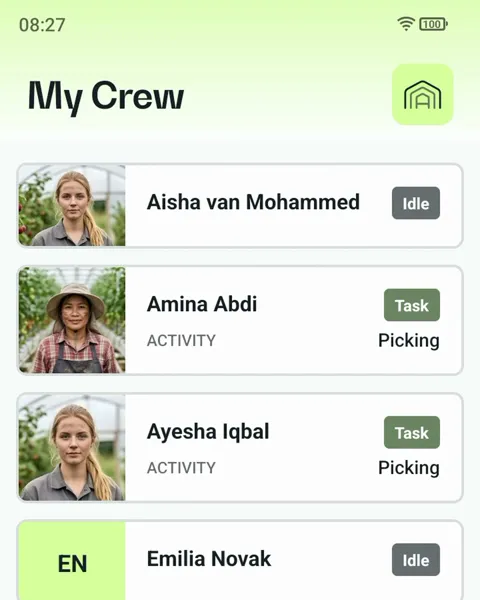
Supervisor
No one left out. A supervisor registers the whole crew, and every count stays on the right name.
Workers need no phone and no reading.
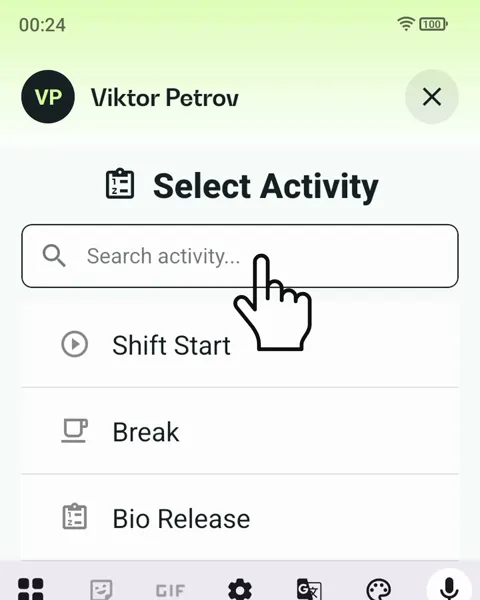
Terminal
The least hardware. One shared phone for many workers, a personal tag each, nothing to sign in to.
At a fixed spot, or moving with the team.
Get started in four steps
No IT team, no installation. Just sign up and go.
1. Sign up
Set up your greenhouse and install the app in under 30 minutes.
2. Start tracking
Use the Android phones your team already has. No extra hardware.
3. Read your numbers
Set up your reports and make smarter calls about your crop and team.
4. Sharpen every season
The longer you use Agromigo, the sharper your picture gets.
Add-ons and what’s next
Two add-ons for Agromigo Partner, both included in Agromigo Ally, and more AI on the way.
Production data
Production data add-on
Weights and counts straight from your scales, sorting lines or other systems → accurate yield and fair performance pay.
€50 per month per integration.
Quality gradings
Quality gradings add-on
Gradings from cameras, sorting machines or graders → you see when quality drops, and get better prices.
€75 per month per integration.
AI forecasting
Future Add-on
Know how many pickers you need and spot yield trends before they become problems.
Frequently asked questions
Which Android version is supported?
Agromigo works on Android 14 and up. Want to scan NFC tags? Just make sure your phone supports NFC and you are good to go.
How do I handle workers without a smartphone?
No problem at all. Supervisors can log hours, quantities, and cart counts on behalf of their entire team using Supervisor Tracking mode. Workers without a device simply scan their personal NFC tag or QR code at a supervisor’s phone. No smartphone needed per worker, and data collection stays fast and accurate.
What if I don’t have internet in my greenhouse?
No worries for day-to-day gaps in coverage. The Agromigo app keeps working offline on the greenhouse floor and syncs automatically as soon as a phone is back online. You still need to provide a reliable internet connection, Wi-Fi or mobile data such as 5G, and a working power supply for the phones themselves: a phone that’s offline for a long stretch, or left uncharged, can’t sync its data to the dashboard until it’s back online and powered on.
What are the Dashboard, Admin app and Crew app?
Agromigo has three parts. The Dashboard is the web app for your office: set up locations, work areas, activities, employees, contracts, workday templates and device profiles there, then review, correct and approve recorded hours, build labor plans, and run reports and payroll exports. The Admin app is a small, separate app for whoever manages your hardware, used for a few minutes at a time to program the NFC tags that identify employees, activities, work areas or carts; it isn’t used to log work. The Crew app is what your team uses to record time, in whichever mode its device profile is set to: Personal, Supervisor or Terminal. Breaks are recorded separately from work in every mode, and a workday template’s automatic break, such as lunch, only applies to a worker who hasn’t recorded their own.
Can my workers use the app in their own language?
Yes! The Agromigo app is available in English, Spanish (with regional versions for Spain and Mexico), Italian, Dutch, Bulgarian, Polish, Georgian, Turkish, and Romanian. Workers see the interface in their own language from day one, which means faster adoption and fewer entry errors. Need another language? Let us know, we are always expanding.
How do I handle seasonal workers who join and leave frequently?
Very easily. Adding and deactivating workers takes seconds. Seasonal workers get their own profile, NFC tag or QR code, and are ready to track from their very first shift. When the season ends, deactivate them in one click. Their historical data stays on file for your records.
How does employee self-onboarding work?
A new employee sets up their own profile on their own phone, from a QR code or invite link you send them, in their own language. They scan their identity document, which Agromigo checks automatically, including whether it has expired, add their details and a profile photo, then review and sign their contract and the other required documents. You see exactly what is done and what is missing, and activate the profile once everything required is in: the final identity and work-authorization check always stays with you, as the law requires.
What exactly can I track per worker?
Quite a lot! For each worker you can track hours worked, plants and stems handled, quantities picked, and carts completed. Everything is linked to the row, zone, and crop, so you always know exactly who did what, where, and when. That data feeds directly into your performance pay calculations and your reports.
How secure is my data?
Very secure! Your data is encrypted in transit and at rest using TLS 1.3 and AES-256. Our infrastructure meets ISO 27001, SOC 2, and GDPR requirements, and cloud backups make sure your data stays safe and strictly yours.
How long does it take to train my supervisors?
Most supervisors are confident using Agromigo after a single two-hour session. The app is designed to be intuitive for people who are not particularly tech-savvy. We provide step-by-step onboarding guides in multiple languages, and our support team is always on hand if anyone gets stuck.
More questions (12)
Do I need on-premise server hardware?
Not at all! Agromigo runs entirely on Cloud, so your team can use the phones they already have. No fixed terminals, no servers, and no on-premise installation needed. Just Wi-Fi and internet, a web browser (Google Chrome, Microsoft Edge, or Apple Safari) for the dashboard, and one or more Android smartphones for the Agromigo app. Once synced, the app works fully offline on the greenhouse floor.
Which mobile phone is recommended?
For the Agromigo Crew app, we recommend the Armor X12 Pro. It is a robust, reliable device that withstands greenhouse conditions well and is widely used in the sector. Currently, only Android phones are supported.
Which NFC tags are recommended?
We recommend Ntag215 NFC tags. They are ISO/IEC 14443 Type A compliant, with 504 bytes of user memory, rewritable, and operating at 13.56 MHz. They work great for scanning in the Agromigo app and can be programmed directly from the app itself. A worker always taps their tag against the back of the phone, where its NFC reader is, also when the phone is used as a shared terminal.
Which QR codes are supported?
QR codes come straight from the Agromigo dashboard, so they work best within our system. Each code carries Agromigo-specific info to help you track and manage your crops easily.
Can I track multiple crops or varieties at the same time?
Absolutely. With Agromigo, you can gain insights into the performance of multiple crops, varieties, and zones. Each row, block, or zone has its own configuration, keeping your data organized and separated, even during busy periods with multiple harvests at the same time.
Does Agromigo work with my existing scales or sorting line?
Production data is an add-on built to connect to a wide range of scales, sorting lines and other systems. If you are unsure whether your equipment will be compatible, just send us the make and model and we will check it for you before you commit to anything.
Can I set different access levels for different staff members?
Yes. Agromigo uses role-based access control. A picker sees only their own tasks and output. A supervisor sees their team. A manager sees the full operation. You decide who sees what, keeping sensitive pay and performance data visible only to the right people.
Can I lock phones so workers only use the Agromigo app?
Yes, and it is easier to set up than you might think. App lock, included for everyone, locks your phones so workers can only access the Agromigo app. No social media, no other apps, no digging around in settings. It is ideal for operations where you hand out shared devices on the greenhouse floor. Workers stay focused, your data stays protected, and everything is managed remotely from your Workforce dashboard. No technical knowledge required.
What happens to my data if I cancel my subscription?
Your data is yours, always. After cancellation you get a full export of all your historical data in a standard format. We keep your data available for 90 days after cancellation so you have plenty of time to download everything you need.
Can I connect my existing systems?
Absolutely! Agromigo integrates with standard payroll systems and climate sensors via the API, part of every plan. What each plan includes is on the pricing page. Need something more tailored? We build custom integrations for specific machines or dashboards as custom work at €90 per hour.
How does the AI actually help me?
It gets to know your operation over time! It can tell you things like “You’ll need 8 pickers next Tuesday” or “Row 12 is yielding 20% less than last week.” Our AI models are continuously trained on anonymised data across all Agromigo users, so forecasting accuracy keeps improving as the dataset grows.
Are there any contracts?
Agromigo is a yearly subscription, paid upfront. You try it free for 1 month first. To cancel, let us know at least 1 month before your renewal date and your contract ends at the end of the current contract year. Prices only change at renewal, with at least 60 days’ written notice.
Your first month is on us.
Try any plan free for 1 month.